PikaShow APK

PikaShow APK is an entertainment app that brings movies, web series, TV shows, live TV channels, sports, news and other video content together in one place.
Download v95 Latest Version 2026
| Information | Details |
| App Name | PikaShow APK |
| Latest Version | v95 |
| App Type | Entertainment |
| Category | Streaming & Entertainment |
| Platform | Android |
| App Format | APK |
| Content | Movies, TV Shows, Web Series, Sports, Live TV & News |
| Installation | Manual APK Installation |
| Last Updated | 32 Second ago |
- PikaShow APK
- What Is PikaShow APK?
- Why Is PikaShow Popular?
- How to Download PikaShow APK on Android
- PikaShow APK for PC and Laptop
- PikaShow APK for iOS
- How to Use PikaShow APK
- PikaShow APK for Android TV
- PikaShow APK for Firestick
- PikaShow APK Not Working? Common Problems and Solutions
- Is PikaShow APK Safe?
- Is PikaShow APK Legal?
- Pros and Cons of PikaShow APK
- FAQs
- Final Thought
What Is PikaShow APK?
PikaShow APK is a streaming app for Android that brings different types of entertainment into one place. Movies, TV shows, web series, live TV channels, sports, and news can all be found through the app. Rather than switching between different applications, users can browse these categories from the same interface. The available content can be found through the menus or by using the search option.
PikaShow APK is simply the Android installation file of the app. It is downloaded separately and installed on the device instead of being installed directly through Google Play.
Why Is PikaShow Popular?
PikaShow has attracted attention because different types of entertainment are available through one platform. Users can explore movies, web series, TV shows, live sports, television channels, and news without switching between multiple applications.
Another reason behind its popularity is the simple and easy-to-use interface. Content can be searched directly, while different categories help users discover something according to their interests. The app is also suitable for people who prefer watching entertainment on mobile devices and want movies, sports, and live TV options in one place.
How to Download PikaShow APK on Android
Downloading and installing PikaShow APK on Android is a process. Follow these steps to install the app:
Step 1: Download the APK
Open a browser go to the PikaShow download page and tap the download button to get the APK file.
Step 2: Allow Installation
If needed go to Android security settings and enable installation from sources, for the browser or file manager.
Step 3: Find the APK File
Open the Downloads folder. Use the file manager to find the downloaded PikaShow APK file.
Step 4: Install the App
Tap the APK file. Choose Install when the installation screen appears.
Step 5: Complete Installation
Wait a seconds while the installation finishes. Once done the PikaShow icon will show up in the app drawer.
Step 6: Open PikaShow
Launch the app and start exploring movies, TV shows, sports, live channels and other content.
PikaShow APK for PC and Laptop
PikaShow is an app made for Android devices. It can also be used on Windows PCs and laptops by using an Android emulator. Emulators like BlueStacks, LDPlayer and NoxPlayer help create an Android- system on a computer. This allows users to run apps designed for Android even if they are not on a phone.
How to Install PikaShow on PC
- First, Install an Android emulator on your computer.
- Launch the emulator after installation.
- Download the PikaShow APK file from a trusted source.
- Open the emulator. Drag the APK file into it.. Use the emulator’s built-in option to install the file.
- Wait until the installation finishes. The process may take a moments depending on your device.
- Installed, open PikaShow from inside the emulator.
- Start exploring all the content in the app.
A good PC with memory and storage usually gives better performance when running an emulator. This helps make the experience smoother and faster.
PikaShow APK for iOS
The Android version of PikaShow comes as an APK file.. Iphones and iPads use a different format called IPA. Some websites might say they have PikaShow iOS or PikaShow IPA. They might also offer an iPhone version. However these versions should be handled with care.
Installing apps on iOS is different from installing APK files on Android. Apple devices have rules about what apps can be installed. There are ways to get third-party apps on iPhone or iPad. Most users need to rely on sources, like the App Store.
If you see any website offering a PikaShow iOS version be cautious. Installing configuration profiles or suspicious files can harm your device. These files might come with malware or spyware. Always check if the method is safe and approved by Apple.
It is best to avoid installations. Stick to trusted and verified methods.

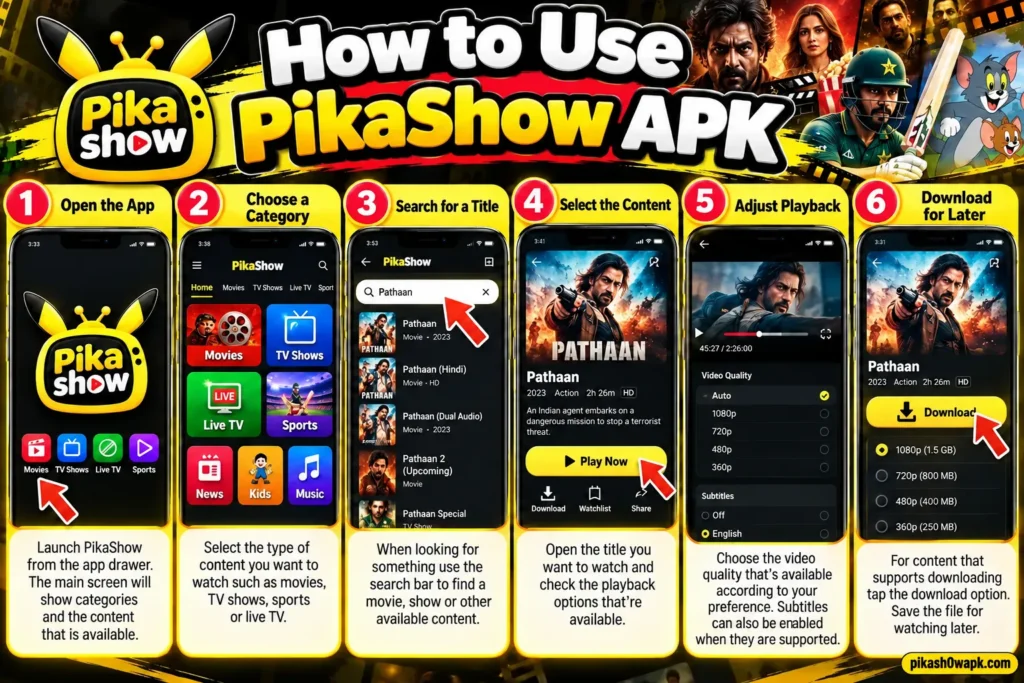
How to Use PikaShow APK
After installing the application PikaShow can be used to browse and watch the content that’s available.
Step 1: Open the App
Launch PikaShow from the app drawer. The main screen will show categories and the content that is available.
Step 2: Choose a Category
Select the type of content you want to watch such as movies, TV shows, sports or live TV.
Step 3: Search for a When looking for something use the search bar to find a movie, show or other available content.
Step 4: Select the Content
Open the title you want to watch and check the playback options that’re available.
Step 5: Adjust Playback
Choose the video quality that’s available according to your preference. Subtitles can also be enabled when they are supported.
Step 6: Download, for Later
For content that supports downloading tap the download option. Save the file for watching later.
PikaShow APK System Requirements
The basic requirements depend on the device and version being used.
A compatible Android device should have:
- Android operating system
- Sufficient RAM
- free storage
- Stable Wi-Fi or mobile data
- Compatible display
- Updated system software where possible
For PC use an emulator such, as BlueStacks, MEmu, LDPlayer or NoxPlayer can be installed.
The more demanding the video quality the more processing power and internet bandwidth may be required.
Latest Version of PikaShow APK
The latest version of PikaShow APK on this page is v95. It is usually better to use the recent version because updates often bring improvements, in performance, content access, playback quality and device compatibility. An updated version can also fix issues that may appear in versions.
Sometimes streaming links, server connections or app parts change over time which makes older versions work reliably. Before installing an APK it’s good practice to remove the old one if needed. Also make sure your device has storage space to install the update.

Features of PikaShow APK
PikaShow brings different types of entertainment into one application. Some of its main features include:
Wide Range of Content
Movies, TV shows, web series, live TV, sports, news, and regional content can be explored from one place.
Movies and Web Series
Users can browse movies and web series by category or search for a specific title.
Live TV Channels
The app provides access to different types of live channels, including news, sports, entertainment, music, and kids content.
Live Sports
Cricket, football, basketball, tennis, wrestling, and other sporting events may be available.
HD and 4K Streaming
Supported content may offer HD, Full HD, or 4K playback depending on the available source.
Simple Interface
The main categories and search option make it easier to find movies, shows, sports, and live channels.
Search Function
A built-in search option can be used to quickly find movies, series, actors, or programs.
Subtitle Support
Supported videos may include subtitles and different language options for easier viewing.
Multiple Languages
Content may be available in Hindi, English, Punjabi, Tamil, Telugu, Malayalam, Bengali, and other languages.
Built-in Video Player
Videos can be played directly inside the app with common playback controls and subtitle options.
Download and Offline Viewing
Supported content can be downloaded and watched later without an active internet connection.
Casting Support
Compatible content may be cast to a Smart TV or another larger display.
Regular Updates
Updates may introduce changes, improve playback, refresh available sources, and fix common issues.
PikaShow APK for Android TV
PikaShow can be used on Android TV devices and TV boxes. A bigger screen makes watching movies, sports and live TV more enjoyable.
Depending on the TV device the APK might need to be installed. Navigation using the remote can differ between devices.
Some TV setups work better with a mouse, air mouse or another way to move around especially if the buttons on the remote are hard to press.
PikaShow APK for Firestick
PikaShow can also be installed on Fire TV and Firestick devices that support APKs.
After turning on the needed settings for installation the APK can be moved to the device. Downloaded directly and then installed.
Because Firestick devices are different, from Android phones the installation screen might look a little different.
PikaShow APK Not Working? Common Problems and Solutions
Like many third-party streaming applications, PikaShow may sometimes experience technical issues.
PikaShow Not Opening
If the application does not open, the following steps may help:
- Restart the device.
- Clear the application cache.
- Check the internet connection.
- Make sure sufficient storage is available.
- Install the latest available version.
Video Not Playing
If a selected video does not play, the issue may be related to the specific source.
Try another available source if one is provided. The internet connection should also be checked.
PikaShow Buffering
Buffering can happen because of a slow internet connection, high server traffic, or the selected video quality.
Try lowering the playback quality and closing other applications that are using the network.
Restarting the router or switching to mobile data may also help.
Server Connection Error
A server may sometimes become temporarily unavailable.
In this case, the internet connection can be restarted, another network can be tested, or the content can be opened again later.
APK Not Installing
An “App Not Installed” error can occur because of insufficient storage, an incomplete download, Android compatibility problems, or another installed version creating a conflict.
Make sure the APK download has completed correctly and enough storage is available before trying again.
App Freezing or Crashing
If PikaShow freezes during use, close unnecessary background applications and restart the app.
Clearing the cache and freeing storage space may also improve performance.
Content Not Available
Some movies, shows, or streams may become unavailable when the source changes or a file is removed.
Trying another source or another title can sometimes solve the problem.
Casting Error
If casting is not working, make sure the phone and TV are connected to the same Wi-Fi network.
The receiving device should also support the selected casting method.
Is PikaShow APK Safe?
Safety can depend a lot, on where the APK file comes from and which version is being installed.
Since APK files can be shared through third-party websites it’s important to be careful when downloading the installer.
Before installing the file should be checked using security tools. Also avoid giving permissions that aren’t needed.
Do not install APK files just because they are called PikaShow. Fake or altered versions might carry software, annoying ads or other security problems.
To stay safer always check the downloaded file before installing and review the permissions it asks for.
Is PikaShow APK Legal?
The legal status of streaming applications can depend on the content being distributed licensing arrangements and the copyright laws of the country where the service is being used.
PikaShow is generally described as a third-party streaming application. Some of the content, through such services may not be officially licensed in every region.
Users should therefore understand the copyright rules that apply in their country before accessing or downloading content.
Pros and Cons of PikaShow APK
Pros
- Movies, TV shows, web series, sports, and live TV can be accessed from one application.
- The interface is simple and easy to navigate.
- Search and categories make content discovery easier.
- Different video quality options may be available.
- Subtitles can be supported on selected content.
- Offline downloads may be available for supported videos.
- The app can be used on compatible Android devices.
- PC use is possible through Android emulators.
- Live sports and television content are included.
- Multiple languages and regional content may be available.
Cons
- It is a third-party APK application.
- Availability of content may change.
- Some sources may become unavailable.
- Streaming performance depends on internet speed and server conditions.
- Unofficial APK sources can create security and privacy concerns.
- iOS installation is not as straightforward as Android APK installation.
- Some content may not be available in every region.
Best Alternatives to PikaShow
Several other platforms can be considered when different features, content libraries, or device support are required.
Hotstar
Hotstar provides movies, TV shows, and live sports, with a broad selection of entertainment content.
Stremio
Stremio is another entertainment platform that can be used to organize and access different types of video content through a simple interface.
YouTube TV
YouTube TV focuses on live television and includes channels covering news, sports, and entertainment.
JioTV
JioTV provides access to a large range of live television channels across multiple categories.
HD Streamz
HD Streamz is associated with live television, sports, radio, and international channels in different languages.
FAQs
Is PikaShow APK free?
PikaShow is generally presented as a free entertainment application through which movies, TV shows, sports, and live channels can be accessed.
What is the latest version of PikaShow APK?
The latest version listed here is PikaShow v94.
Is PikaShow available on Google Play Store?
PikaShow is distributed as a third-party APK and is not normally installed through the standard Google Play Store method.
Can I use PikaShow on Android TV?
PikaShow can be used on compatible Android TV devices and TV boxes through an APK installation process.
Can PikaShow be installed on a PC?
Yes. Since it is an Android-based application, an Android emulator such as BlueStacks or NoxPlayer can be used on a Windows PC or laptop.
Is PikaShow available for iPhone?
PikaShow is primarily distributed as an Android APK. Any website offering an iOS version should be approached carefully and checked before installing profiles or files.
Can I download movies from PikaShow?
Supported movies and shows may include a download option that allows offline viewing.
Does PikaShow support subtitles?
Yes, subtitle support may be available on selected movies and TV shows.
Final Thought
PikaShow APK brings together movies TV shows, web series, live TV, sports, news and other video content in one place. The latest version on this page is v95, which can be manually installed on Android devices. Android TV users and PC users can use supported installation methods. Features such as search, content categories, subtitles live sports and downloading offer entertainment options through one platform. Before installation check the APK source, device compatibility, permissions and content availability, in your region.